
Introducing JatayuOS 1.0 Udaan
Meet JatayuOS 1.0 Udaan: a free Debian 13 desktop with KDE Plasma, Jatayu Tools, live-session access and offline installation, made in India.
“Udaan Aapki. Shakti Bharat Ki.”
Meet JatayuOS 1.0 Udaan. The tested build is complete, with the public ISO download planned for 11 October 2026. It is a free, Debian-based Linux distribution with the KDE Plasma desktop, made in India and maintained by me, Anup Yadav. JatayuOS is built for people who want a ready-to-use desktop for everyday work, study and personal computing, with a few tools of our own that make the first day easier.
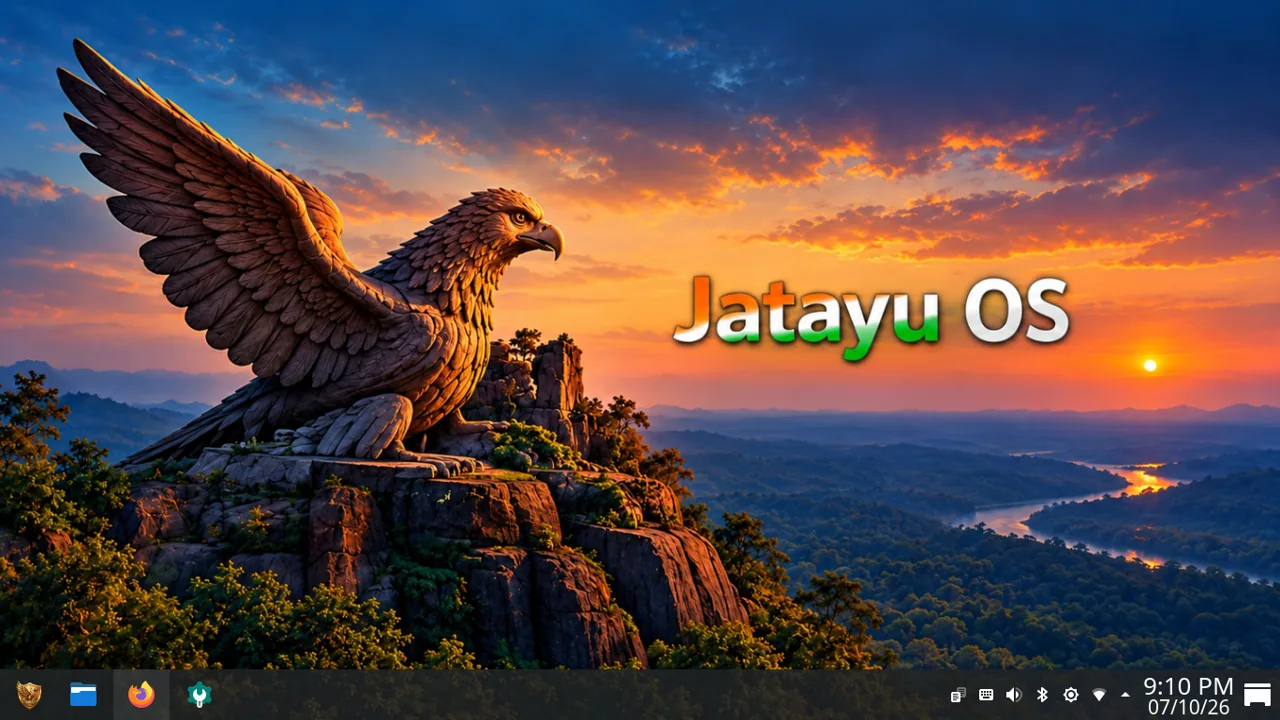
JatayuOS runs on compatible 64-bit Intel and AMD computers (AMD64 / x86-64). You can try it from a live session before installing anything.
Why Jatayu, and why Udaan
The name draws on Jatayu from the Ramayana, remembered for courage, service and protection. We chose it as a respectful reference to those values, which we want to carry into a desktop that is simple to use and generous with help.
Udaan means “flight.” Version 1.0 is the first step of that journey, and the tagline, “Udaan Aapki. Shakti Bharat Ki.”, reflects the idea of a desktop that helps you take off.
JatayuOS is an independent project. It is not affiliated with, funded by or endorsed by the Government of India. “Made in India” describes where the project comes from. You can read more on the About page.
Release specifications and system requirements
JatayuOS 1.0 Udaan is based on Debian 13 (Trixie), uses the KDE Plasma desktop and supports AMD64 / x86-64 computers. The final ISO size will be listed with the public download. Software management includes APT + Flatpak: APT manages Debian packages and system updates, while Flatpak provides an additional route for desktop applications.
You need a 64-bit Intel or AMD processor, at least 4 GB RAM, 25 GB of free storage and a 1024 × 768 display. For smoother multitasking, we recommend 8 GB RAM or more, 40 GB of free storage or more, a modern 64-bit processor and a Full HD (1920 × 1080) display. Allow additional space for your own files and applications.
See the complete specifications and system requirements, then follow the installation guide. Try the live session first to check your computer’s display, Wi-Fi and sound.
A familiar foundation: Debian and KDE Plasma
JatayuOS is built on Debian 13 and uses the KDE Plasma desktop. Debian is known for its careful, community-driven approach to packaging, and Plasma gives you a flexible, familiar desktop with a panel, launcher and plenty of settings to adjust.
Everyday software is ready from the start:
- Firefox ESR for browsing the web.
- LibreOffice for documents, spreadsheets and presentations.
- Dolphin for managing files and folders.
That covers writing an assignment, building a budget sheet, browsing and organising your files without installing anything first. We make no promise of perfect compatibility with every Microsoft Office file or proprietary application, but for most day-to-day work these tools are a solid start.
Debian, the Linux kernel, KDE and the many application communities behind this software make JatayuOS possible. Our Credits and licences page gives the detailed attribution.
The Jatayu application collection
On top of that foundation, we’ve added applications and starting points of our own. The Jatayu Apps page gives an overview.
Aarambh: where you begin
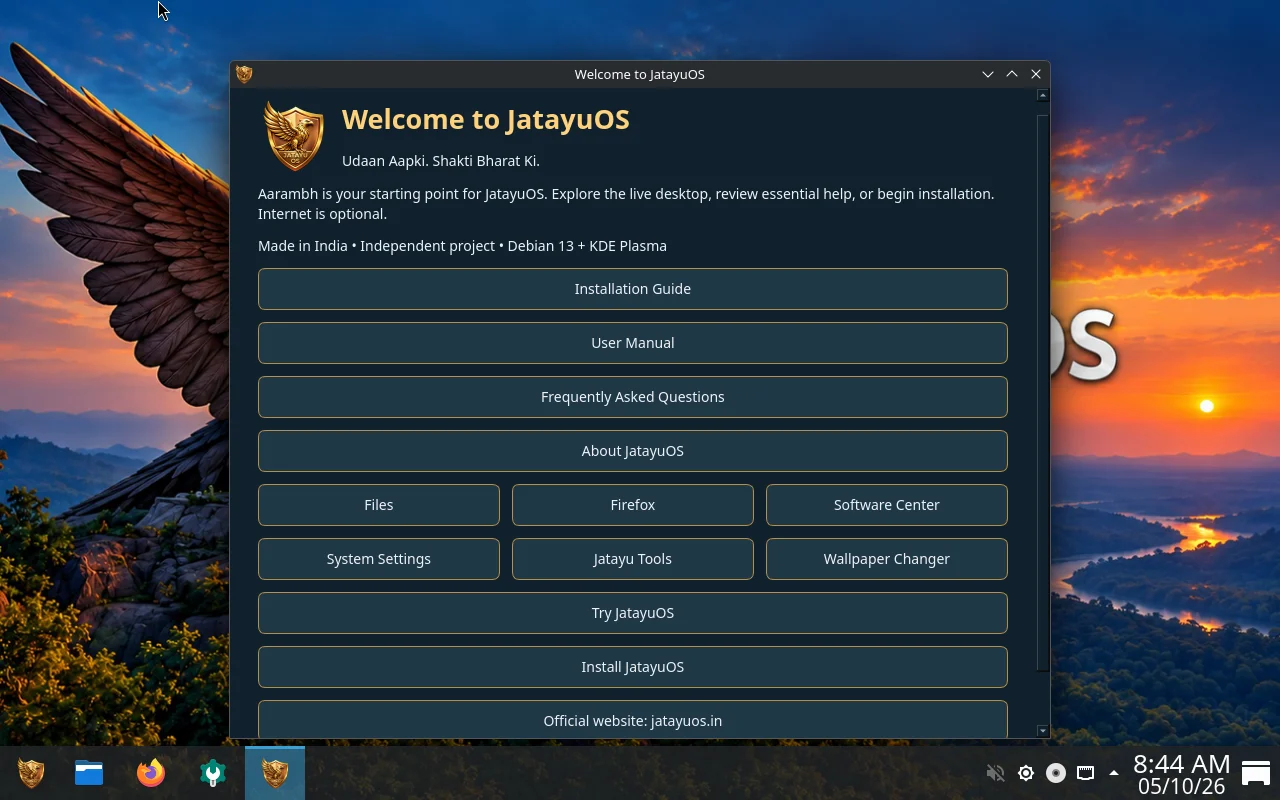
Aarambh is the welcome application. It gathers help, desktop shortcuts and installation entry points in one window. You’ll find the Installation Guide, User Manual, Frequently Asked Questions and About JatayuOS, along with shortcuts to Files, Firefox, Software Center and System Settings. It also links to Jatayu Tools and Wallpaper Changer, and offers Try JatayuOS and Install JatayuOS.
If you’re new to Linux, start here. Your First Steps with JatayuOS walks through it in more detail.
Jatayu Tools Creative Studio: image and PDF work
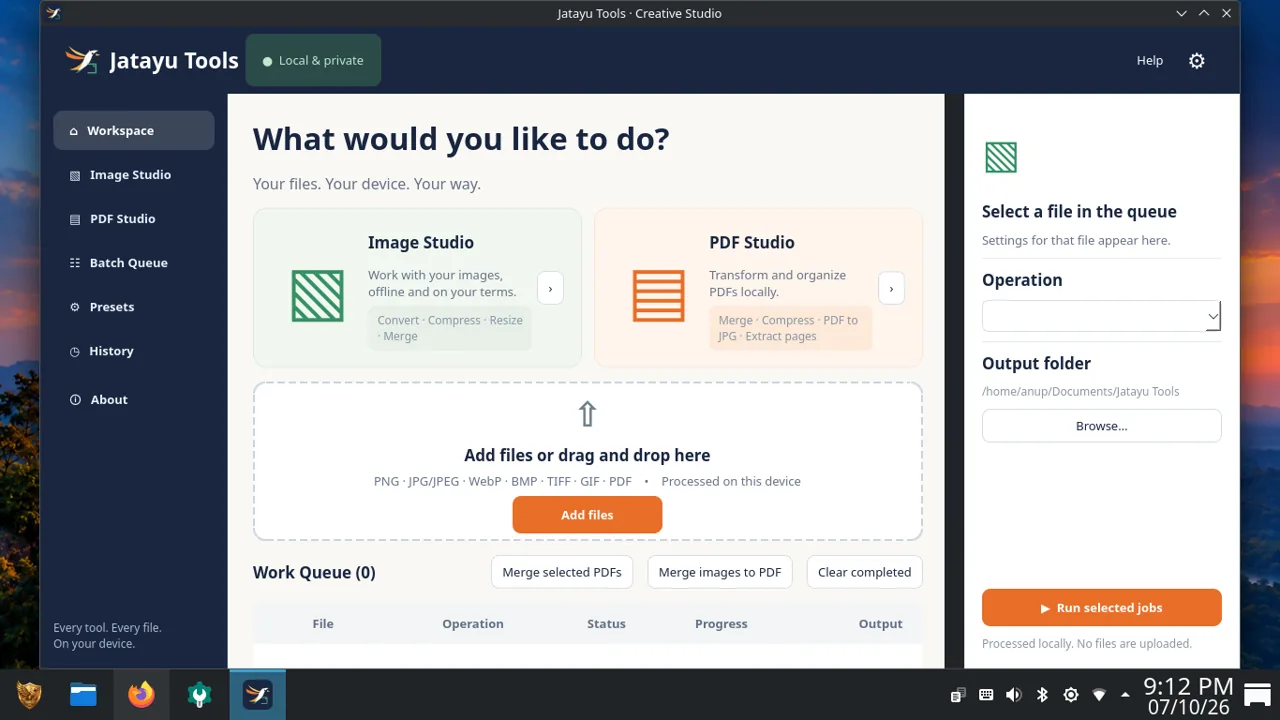
Creative Studio brings image and PDF jobs into one workspace.
- Image Studio handles conversion, compression, resizing and merging.
- PDF Studio handles merging, compression, PDF-to-JPG conversion and page extraction.
You add files to a queue, choose settings for the operation, pick an output folder and run the selected jobs. Batch Queue, Presets, History and About sections keep the workspace organised.
Two examples of how you might use it: resizing a picture before adding it to a blog post, or combining several pages into one PDF for a document submission. The workspace describes its processing as local and on-device, which means your files are prepared on your own computer. That description applies to Creative Studio, not to the whole operating system. Create more with Jatayu Tools goes deeper.
Jatayu Wallpaper Changer: make the desktop yours
Wallpaper Changer gives you a visual library of backgrounds with a preview of your selected image. You can browse the Library, keep Favourites, point it at your own folders, explore Slideshow options and adjust Settings. Choose your display and layout, preview the result, then select Apply Wallpaper.
Kavach: safer digital habits
Kavach is a local web application for security and scam awareness. It offers guidance and checklists that help you build safer habits online. It is an educational resource, not an antivirus or a guarantee against fraud.
Sarkar Setu: public-service links in one place
Sarkar Setu is a starting point for finding official public-service portals from your desktop. If you need a particular government service, you can find the relevant link quickly. The portals themselves provide the services and set their own requirements, and you’ll need an internet connection to visit them.
Utsav: festivals and culture
Utsav is an Indian festival and Panchang application with daily, calendar and upcoming views. It’s there for anyone who likes to keep track of festivals and cultural dates in one place.
Optional Android apps with Waydroid
JatayuOS includes Waydroid packages as a starting point for using Android apps on the desktop. Android image setup is a separate step that you complete yourself, and it can require an internet connection. Compatibility depends on your hardware and the individual app. The official Waydroid documentation explains the setup process.
JatayuOS 1.0 Udaan at a glance
| Feature | What is included | How it helps |
|---|---|---|
| Foundation | Debian 13 with KDE Plasma, for x86-64 computers | A familiar, established base for daily use |
| Aarambh | Guides, FAQ, shortcuts, Try and Install options | A clear starting point on your first boot |
| Creative Studio | Image Studio and PDF Studio with a job queue | Prepare images and PDFs in one workspace |
| Wallpaper Changer | Library, favourites, slideshow, layout controls | Preview and choose a background for your desktop |
| Everyday applications | Firefox ESR, LibreOffice, Dolphin | Browse, write and manage files from day one |
| Offline installation | Install from the ISO without internet | Set up JatayuOS even without a connection |
JatayuOS shares its foundation with any Debian and KDE Plasma setup. What we add is our own application collection, a distinct desktop identity and a welcoming first-run experience. It is our approach to the same strong foundation.
Who will find it useful
JatayuOS is a good fit if you want a Debian-based desktop that feels organised from the first boot. Students, home users and anyone moving to Linux for the first time may appreciate having guides and common tools in one place. If you work with images and PDFs regularly, or want quick access to public-service portals and cultural information, the Jatayu apps are there for you.
Try it, then install it
You can explore JatayuOS before committing to anything. In the live session, sign in with:
- Username:
jatayuos - Password:
live
These public credentials apply only to the live environment. When you install JatayuOS, you create your own account and password, and you use that account from then on.
You don’t need an internet connection to install JatayuOS from its ISO. Downloading the ISO, updates, online services and optional online setup do need connectivity.
Before installing, we suggest:
- Trying the live desktop to see how it behaves on your computer.
- Reading the installation guide.
- Backing up your important files.
- Reviewing the selected installation disk carefully before you confirm.
Getting JatayuOS
Visit the official Download page for the ISO, system requirements and installation resources. After downloading, check the file against the official SHA256 checksum published there. A matching checksum confirms that your copy matches the published ISO checksum and helps detect incomplete or altered downloads.
If you have questions, feedback or corrections, the Support page is the place to start, or write to [email protected].
Frequently asked questions
What is JatayuOS 1.0 Udaan?
It is the first release of JatayuOS, a free Debian-based Linux desktop with KDE Plasma, made in India. It includes everyday software and our own Jatayu applications.
Is JatayuOS free?
Yes. No purchase is required to download or install it.
Does installing JatayuOS require internet?
No. You can install from the ISO offline, although downloading the ISO and updates need a connection.
What are the live-session username and password?
The username is jatayuos and the password is live. They apply to the live session only; you create your own account during installation.
Which applications are included?
Firefox ESR, LibreOffice and Dolphin come with the desktop, along with Aarambh, Jatayu Tools, Wallpaper Changer, Kavach, Sarkar Setu and Utsav.
Can I use Android applications through Waydroid?
Waydroid packages are included, and you complete Android setup separately. Compatibility varies by hardware and app.
Is JatayuOS a Government of India project?
No. It is an independent project with no affiliation, funding or endorsement from the Government of India.
Take your first step
We built JatayuOS to be approachable, practical and ready to grow with you. Start with the live session, open Aarambh and see where it takes you. Thank you for flying with us.
Disclaimer: Hardware and application compatibility can vary. Follow the installation guide, back up your files and refer to the official release information for your setup. Third-party names and software remain the property of their respective owners.
Keep exploring.
JatayuOS Beginner Guide: Live Login and Installation
Try the JatayuOS live desktop, use the live login, verify your ISO and prepare for installation with practical steps and original screenshots.
6 Oct 2026Create More with Jatayu Tools
Discover JatayuOS apps with original screenshots: Creative Studio for image and PDF workflows, Aarambh, Wallpaper Changer, Kavach, Sarkar Setu and Utsav.
6 Oct 2026